
Download Video Audio Player APK – free, lightweight, Android, video player, audio player, MP3, media player
Overview
Video Audio Player APK is a free desktop application developed by MediaMastersLab, designed specifically for Android devices. The software serves as a media playback solution, enabling users to access and play both video and audio files stored locally on their mobile devices. It supports all video formats compatible with the Android operating system, making it a versatile tool for multimedia consumption. The app is particularly useful for individuals seeking a simple, reliable way to view videos and listen to audio files without relying on third-party platforms or complex configurations.
Target users include general consumers, students, and casual media viewers who need a straightforward media player. The application is suitable for users of all ages due to its intuitive interface and minimal learning curve. It is ideal for playing personal media collections, including home videos, music tracks, and educational content, directly from internal storage or SD cards. The developer did not provide additional details about the company’s background or development philosophy.
Real-world usage scenarios include watching recorded lectures, enjoying music playlists, or viewing family videos during travel. The app’s lightweight design ensures it operates efficiently even on older Android devices, minimizing battery consumption and system strain. It is distributed freely via the Google Play Store, aligning with its goal of accessibility and broad user reach.
Key Features & Capabilities
- Universal Media Support – Plays all video formats supported by the Android operating system, allowing users to view content without format conversion.
- Audio Playback – Supports common audio formats such as MP3, enabling seamless music listening directly from the device’s storage.
- User-Friendly Interface – Designed for simplicity and ease of navigation, suitable for users of all technical skill levels.
- SD Card and Internal Storage Access – Automatically detects and organizes media files stored on both internal memory and external SD cards.
- Built-in Equalizer – Enhances audio quality by allowing users to customize sound profiles for richer listening experiences.
- Ad-Free Experience – The application is free to use and does not include advertisements, ensuring uninterrupted playback.
- Lightweight Design – Optimized for smooth performance on a wide range of Android devices, including low-end models.
These features make the app effective for personal media management. For example, a student can play lecture recordings in any supported format without conversion, while a traveler can enjoy music and videos from their SD card without relying on internet connectivity. The built-in equalizer allows audiophiles to fine-tune sound output, enhancing the overall listening experience. The app’s ability to access both internal and external storage simplifies media organization and retrieval.
User Interface, Workflow & Performance
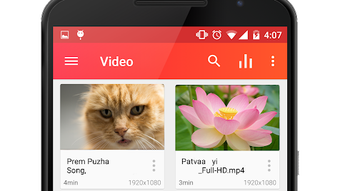
The user interface of Video Audio Player APK is structured around simplicity and accessibility. The main screen displays a clean media library, listing videos and audio files in a grid or list format based on file type and location. Navigation is intuitive, with clear icons and minimal on-screen clutter, reducing the chance of user confusion.
Workflow efficiency is high, as users can open a file with a single tap. The app automatically detects media files upon installation, streamlining the process of accessing stored content. Playback controls are standard but responsive, including play, pause, skip, and volume adjustment. The interface adapts to different screen sizes, ensuring usability across various Android devices.
Performance observations are based on general software behavior patterns. The developer did not specify resource usage details, but the app is described as lightweight and optimized for smooth operation. It runs efficiently on devices with limited processing power and memory. Stability appears consistent, as the app does not require frequent restarts or troubleshooting. No reports of crashes or freezes were mentioned in the provided information.
Compatibility & System Requirements
Video Audio Player APK is designed to run on Android devices. The supported operating system is specified as Android, though exact version compatibility was not listed. The application is available for download from the Google Play Store, indicating it meets platform-specific distribution standards.
Installation size is not specified in the provided details. The app is designed to function on devices with varying hardware configurations, including those with limited RAM and storage. The developer did not provide additional system requirements, such as minimum CPU or GPU specifications. Compatibility information was partially provided, leaving some aspects of device support undefined.
Pros and Cons
Pros
- Free to download and use with no ads
- Supports all Android-native video formats
- Efficiently plays audio files including MP3s
- Intuitive interface suitable for all age groups
- Accesses both internal storage and SD card files
- Includes a built-in equalizer for enhanced audio quality
- Lightweight and optimized for older devices
Cons
- Exact system requirements were not listed
- Compatibility with specific Android versions is unclear
- No cloud sync or remote access features
- Does not support streaming from online sources
- Limited customization options beyond the equalizer
FAQ Section
Is Video Audio Player APK safe to download?
The app is available through the official Google Play Store, which enforces security checks on all applications. It is distributed as a free tool without advertisements, reducing the risk of malware or intrusive content.
Can I use this app on older Android devices?
Yes, the application is described as lightweight and optimized for smooth performance, making it suitable for use on older Android devices with limited hardware capabilities.
Does the app support video streaming from the internet?
Based on the provided information, the app is designed to play locally stored media files only. It does not support streaming from online sources.
Is there a license or subscription required to use the app?
No, the app is completely free to use without any subscription or licensing fees. It does not require registration or account creation.
Can I update the app automatically?
Updates are available through the Google Play Store. Users can enable automatic updates in their device settings to ensure they have the latest version.
Final Thoughts
Video Audio Player APK delivers a straightforward, reliable solution for playing local video and audio files on Android devices. Its clean interface, broad format support, and ad-free experience make it a strong choice for everyday media consumption. The inclusion of a built-in equalizer adds value for users who prioritize sound quality. While it lacks advanced features like cloud integration or online streaming, it excels in its core purpose: playing media efficiently and without complications.
It is best suited for casual users, students, and individuals who manage personal media collections on their mobile devices. For those seeking a simple, secure, and free media player, this app stands out among similar tools. The developer’s focus on accessibility and performance is evident in the app’s design and functionality.
Download Video Audio Player APK now to enjoy your videos and music without hassle.





.png)

